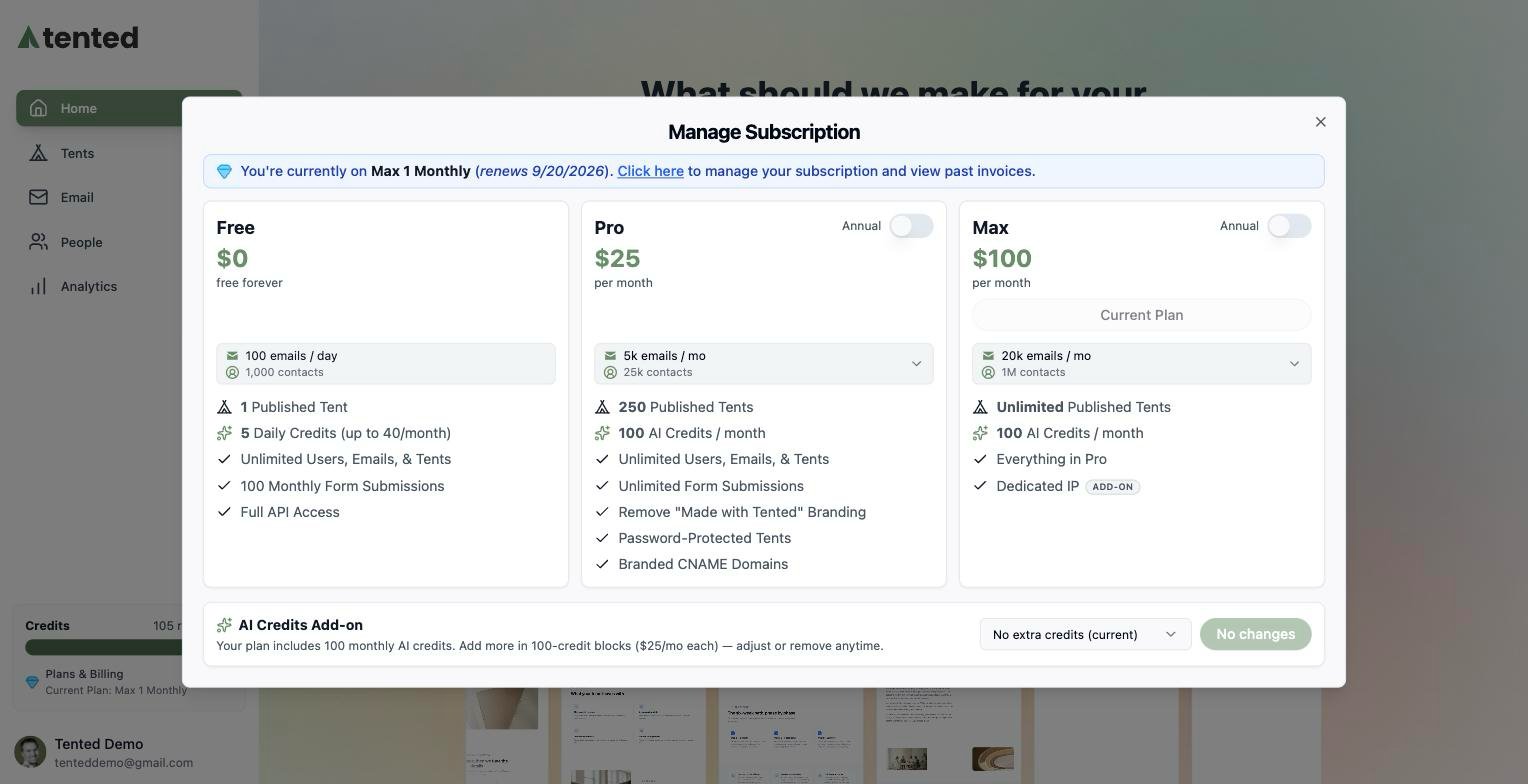
Plan Upgrade Overview

Upgrading your Tented plan gives you access to more features, higher limits, and advanced capabilities. The upgrade process is simple and can be done at any time to meet your growing needs.

Available Plans

Plan Tiers

Starter Plan:
  • Price: Free
  • Tents: Up to 3 tents
  • Form Submissions: 100 per month
  • Storage: 1GB
  • Features: Basic AI generation, standard templates
Professional Plan:
  • Price: $29/month
  • Tents: Up to 25 tents
  • Form Submissions: 1,000 per month
  • Storage: 10GB
  • Features: Advanced AI, custom branding, analytics
Business Plan:
  • Price: $99/month
  • Tents: Up to 100 tents
  • Form Submissions: 10,000 per month
  • Storage: 50GB
  • Features: Team collaboration, API access, priority support
Enterprise Plan:
  • Price: Custom pricing
  • Tents: Unlimited
  • Form Submissions: Unlimited
  • Storage: Unlimited
  • Features: Custom integrations, dedicated support, SLA

Feature Comparison

Starter Features

  • Basic AI generation
  • Standard templates
  • Mobile responsive design
  • Basic form handling
  • Email support

Professional Features

  • Advanced AI generation
  • Custom branding
  • Analytics dashboard
  • Form analytics
  • Priority support

Business Features

  • Team collaboration
  • API access
  • Custom integrations
  • Advanced analytics
  • Phone support

Enterprise Features

  • Custom integrations
  • Dedicated support
  • SLA guarantees
  • Custom training
  • On-premise options

Upgrade Process

Step-by-Step Upgrade

1. Access Billing Settings:
  • Navigate to your account settings
  • Click on “Billing & Subscription”
  • Review current plan details
  • Click “Upgrade Plan”
2. Choose Your Plan:
  • Compare available plans
  • Select the plan that meets your needs
  • Review plan features and limits
  • Confirm your selection
3. Payment Information:
  • Enter payment method (if not already on file)
  • Review billing details
  • Confirm upgrade pricing
  • Complete the upgrade
4. Immediate Activation:
  • New plan features are available immediately
  • Increased limits take effect right away
  • Access to new features is instant
  • Billing starts on next cycle

Upgrade Options

Monthly Billing:
  • Pay monthly for flexibility
  • Easy to change or cancel
  • No long-term commitment
  • Higher monthly cost
Annual Billing:
  • Save 20% with annual billing
  • Lower effective monthly cost
  • Commitment for full year
  • Best value for long-term use

Upgrade Benefits

Immediate Benefits

Increased Limits:
  • More tents per account
  • Higher form submission limits
  • Increased storage capacity
  • Additional team members
New Features:
  • Advanced AI generation capabilities
  • Custom branding options
  • Enhanced analytics
  • API access and integrations
Better Support:
  • Priority support channels
  • Faster response times
  • Dedicated support team
  • Phone support (Business+)

Long-Term Benefits

Scalability:
  • Grow with your business needs
  • Scale up or down as required
  • No technical limitations
  • Future-proof your investment
ROI Improvement:
  • More efficient tent creation
  • Better conversion rates
  • Reduced development time
  • Higher productivity

Plan Comparison Tool

Feature Matrix

FeatureStarterProfessionalBusinessEnterprise
Tents325100Unlimited
Form Submissions100/month1,000/month10,000/monthUnlimited
Storage1GB10GB50GBUnlimited
Team Members1310Unlimited
API Access
Custom Branding
AnalyticsBasicAdvancedAdvancedCustom
SupportEmailPriorityPhoneDedicated

Use Case Recommendations

For Individuals:
  • Starter: Personal projects, testing
  • Professional: Freelancers, small businesses
For Small Teams:
  • Professional: Small agencies, startups
  • Business: Growing companies, marketing teams
For Large Organizations:
  • Business: Mid-size companies, departments
  • Enterprise: Large corporations, agencies

Upgrade Considerations

When to Upgrade

Immediate Needs:
  • Approaching current plan limits
  • Need for advanced features
  • Team collaboration requirements
  • API integration needs
Growth Planning:
  • Anticipated business growth
  • Upcoming campaigns or projects
  • Team expansion plans
  • Feature requirements
Performance Needs:
  • Need for better support
  • Require faster response times
  • Need dedicated resources
  • Custom integration requirements

Cost-Benefit Analysis

Calculate ROI:
  • Time saved with advanced features
  • Increased conversion rates
  • Reduced development costs
  • Team productivity gains
Compare Alternatives:
  • Cost of building in-house
  • Hiring additional developers
  • Using multiple tools
  • Opportunity costs

Upgrade Support

Pre-Upgrade Assistance

Plan Consultation:
  • Free consultation with sales team
  • Custom plan recommendations
  • Feature requirement analysis
  • Migration planning assistance
Trial Options:
  • Free trial of higher plans
  • Feature demonstrations
  • Proof of concept projects
  • Risk-free evaluation

Post-Upgrade Support

Migration Assistance:
  • Help with data migration
  • Feature training and onboarding
  • Best practices guidance
  • Optimization recommendations
Ongoing Support:
  • Dedicated account manager
  • Regular check-ins
  • Performance optimization
  • Strategic planning assistance

Downgrade Options

When Downgrading Makes Sense

Usage Reduction:
  • Lower tent creation needs
  • Reduced team size
  • Budget constraints
  • Temporary scaling back
Downgrade Process:
  • Contact support team
  • Review current usage
  • Plan downgrade timing
  • Complete downgrade process
Downgrade Considerations:
  • Data retention policies
  • Feature access changes
  • Billing adjustments
  • Migration requirements

Billing and Payment

Payment Methods

Accepted Payment Methods:
  • Credit cards (Visa, MasterCard, American Express)
  • Debit cards
  • PayPal
  • Bank transfers (Enterprise)
  • Wire transfers (Enterprise)
Billing Cycles:
  • Monthly billing
  • Annual billing (20% discount)
  • Quarterly billing (Enterprise)
  • Custom billing cycles (Enterprise)

Invoice Management

Invoice Access:
  • Download invoices from dashboard
  • Email invoice delivery
  • Automatic invoice generation
  • Detailed usage breakdowns
Payment History:
  • Complete payment history
  • Failed payment tracking
  • Refund processing
  • Payment method updates

Getting Help with Upgrades

Support Channels

Sales Team:
  • Plan consultation
  • Custom pricing
  • Enterprise solutions
  • Migration planning
Customer Success:
  • Onboarding assistance
  • Feature training
  • Best practices
  • Optimization help
Technical Support:
  • Technical implementation
  • Integration assistance
  • Troubleshooting
  • Performance optimization

Resources

Documentation:
  • Plan comparison guides
  • Feature documentation
  • Migration guides
  • Best practices
Community:
  • User community forums
  • Expert user advice
  • Success stories
  • Peer support

Next: Managing Your Subscription

Learn how to manage your subscription settings and billing information.