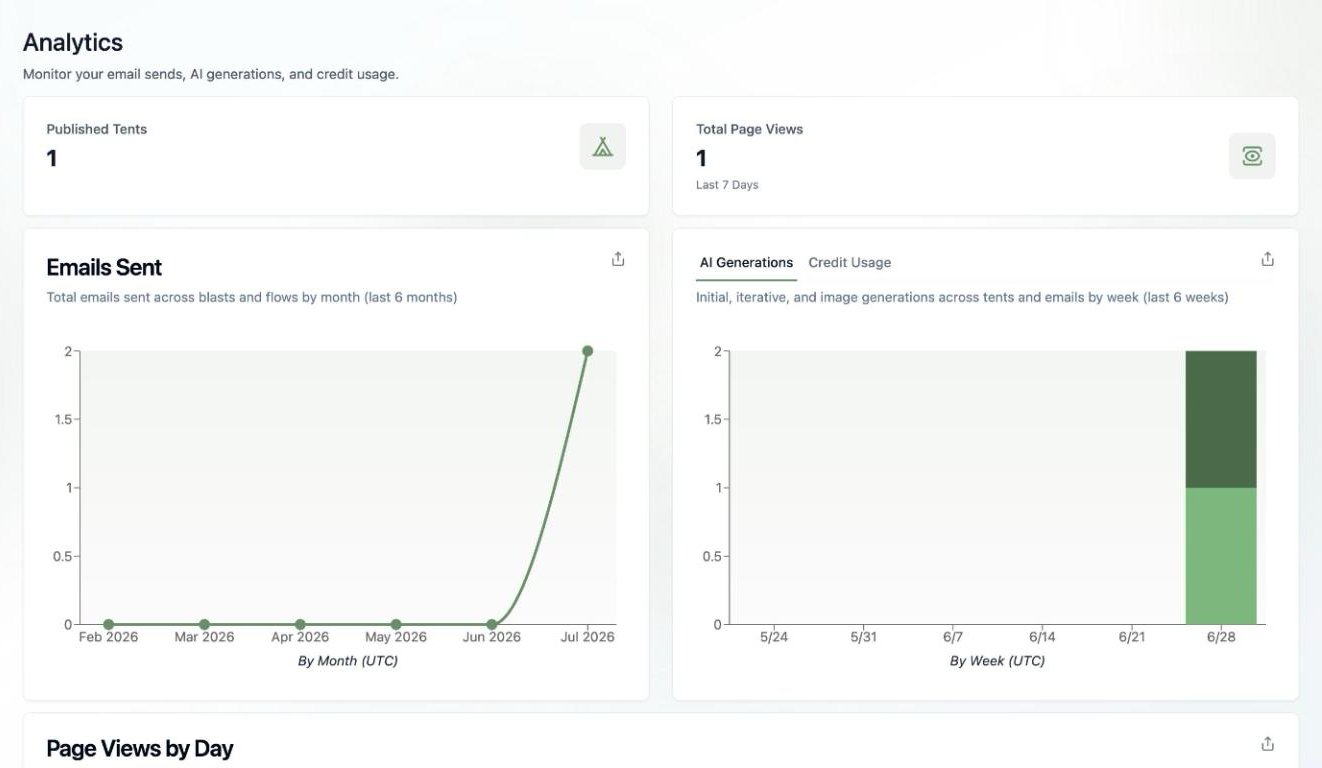
Usage Overview

Monitoring your current usage is essential for managing your Tented subscription effectively. Understanding your usage patterns helps you optimize costs, plan for growth, and avoid unexpected overages.

Usage Dashboard

Current Usage Summary

Key Metrics:
  • Tents: Number of tents created vs. plan limit
  • Form Submissions: Monthly submissions vs. limit
  • Storage: Data storage used vs. available
  • Team Members: Active team members vs. limit
Usage Visualization:
  • Progress bars showing usage vs. limits
  • Color-coded indicators (green, yellow, red)
  • Percentage of limit used
  • Days remaining in billing cycle
Quick Insights:
  • Usage trend (increasing/decreasing)
  • Projected month-end usage
  • Recommendations for optimization
  • Upgrade suggestions if approaching limits

Detailed Usage Breakdown

Tent Usage:
  • Total tents created
  • Active tents (published)
  • Draft tents
  • Archived tents
  • Tents by folder/category
Form Submission Usage:
  • Submissions this month
  • Submissions by tent
  • Peak submission days
  • Average daily submissions
  • Projected month-end submissions
Storage Usage:
  • Total storage used
  • Storage by tent
  • Image storage
  • Asset storage
  • Available storage remaining

Real-Time Monitoring

Live Usage Tracking

Current Activity:
  • Real-time form submissions
  • Active tent editing sessions
  • Team member activity
  • System resource usage
Usage Alerts:
  • Approaching limit warnings
  • Overage notifications
  • Unusual usage patterns
  • Performance alerts
Usage Notifications:
  • Email alerts for high usage
  • Dashboard notifications
  • Mobile app notifications
  • Slack/Teams integrations
Historical Data:
  • Usage over past 6 months
  • Seasonal usage patterns
  • Growth trends
  • Usage spikes and dips
Predictive Analytics:
  • Projected usage for current month
  • Growth projections
  • Capacity planning
  • Budget forecasting
Trend Analysis:
  • Usage growth rate
  • Peak usage periods
  • Usage optimization opportunities
  • Plan upgrade recommendations

Usage by Feature

Tent Creation Usage

Tent Metrics:
  • Tents created this month
  • Tents published this month
  • Tent editing sessions
  • Tent generation requests
Tent Categories:
  • Tents by campaign type
  • Tents by team member
  • Tents by folder
  • Tents by status
Tent Performance:
  • Most active tents
  • Tents with highest submissions
  • Tents with best performance
  • Tents needing attention

Form Submission Usage

Submission Metrics:
  • Total submissions received
  • Submissions by tent
  • Submissions by form type
  • Submission conversion rates
Submission Trends:
  • Daily submission patterns
  • Weekly submission trends
  • Monthly submission growth
  • Seasonal submission patterns
Submission Analysis:
  • Peak submission times
  • Geographic distribution
  • Device breakdown
  • Traffic source analysis

Storage Usage

Storage Breakdown:
  • Image storage usage
  • Asset storage usage
  • Code storage usage
  • Backup storage usage
Storage Optimization:
  • Identify large files
  • Optimize image sizes
  • Clean up unused assets
  • Archive old data
Storage Trends:
  • Storage growth over time
  • Storage usage patterns
  • Storage optimization opportunities
  • Storage cost analysis

Usage Limits and Thresholds

Plan Limits

Current Plan Limits:
  • Maximum tents allowed
  • Monthly form submission limit
  • Storage capacity limit
  • Team member limit
Limit Utilization:
  • Percentage of each limit used
  • Days until limit reached
  • Projected limit usage
  • Overage risk assessment
Limit Management:
  • Proactive limit monitoring
  • Limit increase requests
  • Plan upgrade recommendations
  • Usage optimization suggestions

Threshold Alerts

Warning Thresholds:
  • 80% of limit usage
  • 90% of limit usage
  • 95% of limit usage
  • 100% of limit usage
Alert Types:
  • Email notifications
  • Dashboard warnings
  • Mobile app alerts
  • Slack/Teams notifications
Alert Management:
  • Customize alert thresholds
  • Set up alert recipients
  • Configure alert frequency
  • Manage alert preferences

Usage Optimization

Efficiency Improvements

Usage Optimization Tips:
  • Archive unused tents
  • Optimize image sizes
  • Clean up old form data
  • Remove inactive team members
Best Practices:
  • Regular usage monitoring
  • Proactive limit management
  • Efficient resource utilization
  • Strategic plan selection
Optimization Tools:
  • Usage analysis reports
  • Optimization recommendations
  • Automated cleanup tools
  • Performance monitoring

Cost Optimization

Cost Analysis:
  • Current plan cost vs. usage
  • Overage cost projections
  • Upgrade cost analysis
  • Downgrade cost savings
Cost Optimization Strategies:
  • Right-size your plan
  • Optimize usage patterns
  • Take advantage of discounts
  • Monitor for overages
ROI Analysis:
  • Value per tent created
  • Cost per form submission
  • Cost per team member
  • Overall ROI calculation

Usage Reporting

Automated Reports

Usage Reports:
  • Daily usage summaries
  • Weekly usage reports
  • Monthly usage analysis
  • Quarterly usage reviews
Report Types:
  • Executive summaries
  • Detailed usage breakdowns
  • Trend analysis reports
  • Optimization recommendations
Report Delivery:
  • Email delivery
  • Dashboard access
  • PDF downloads
  • API access for integration

Custom Reports

Custom Report Builder:
  • Create custom usage reports
  • Select specific metrics
  • Choose date ranges
  • Set up automated delivery
Report Customization:
  • Custom metrics and KPIs
  • Branded report templates
  • Custom data visualizations
  • Integration with external tools
Report Sharing:
  • Share reports with team
  • Export to external systems
  • Schedule regular reports
  • Set up report subscriptions

Usage Analytics

Advanced Analytics

Usage Patterns:
  • Identify usage patterns
  • Analyze usage trends
  • Predict future usage
  • Optimize usage strategies
Performance Metrics:
  • Usage efficiency metrics
  • Cost per action metrics
  • ROI calculations
  • Performance benchmarks
Comparative Analysis:
  • Compare usage across periods
  • Benchmark against industry standards
  • Compare team member usage
  • Analyze usage by project

Predictive Analytics

Usage Forecasting:
  • Predict future usage needs
  • Forecast capacity requirements
  • Plan for growth
  • Budget planning
Trend Analysis:
  • Identify usage trends
  • Predict seasonal patterns
  • Forecast growth rates
  • Plan capacity needs
Optimization Predictions:
  • Predict optimization opportunities
  • Forecast cost savings
  • Predict upgrade needs
  • Plan resource allocation

Troubleshooting Usage Issues

Common Issues

Inaccurate Usage Data:
  • Check data refresh timing
  • Verify usage calculations
  • Review data sources
  • Contact support if needed
Missing Usage Data:
  • Check date ranges
  • Verify data collection
  • Review system status
  • Report missing data
Unexpected Usage Spikes:
  • Investigate usage sources
  • Check for system issues
  • Review recent changes
  • Monitor for anomalies

Getting Help

Usage Support:
  • Usage analysis assistance
  • Optimization recommendations
  • Plan upgrade guidance
  • Cost optimization help
Technical Support:
  • Data accuracy issues
  • System integration problems
  • Performance optimization
  • Troubleshooting assistance
Account Management:
  • Plan optimization
  • Usage planning
  • Growth planning
  • Strategic guidance

Best Practices

Usage Monitoring

Regular Monitoring:
  • Check usage daily
  • Review trends weekly
  • Analyze patterns monthly
  • Plan quarterly reviews
Proactive Management:
  • Set up usage alerts
  • Monitor approaching limits
  • Plan for growth
  • Optimize continuously
Documentation:
  • Document usage patterns
  • Track optimization efforts
  • Record cost savings
  • Maintain usage history

Optimization Strategies

Efficient Usage:
  • Use resources efficiently
  • Optimize tent performance
  • Clean up unused data
  • Archive old content
Strategic Planning:
  • Plan usage growth
  • Budget for increases
  • Monitor market trends
  • Optimize for ROI
Continuous Improvement:
  • Regular optimization reviews
  • Implement best practices
  • Monitor performance
  • Adjust strategies as needed

Back to Billing Overview

Return to the billing and subscriptions overview.