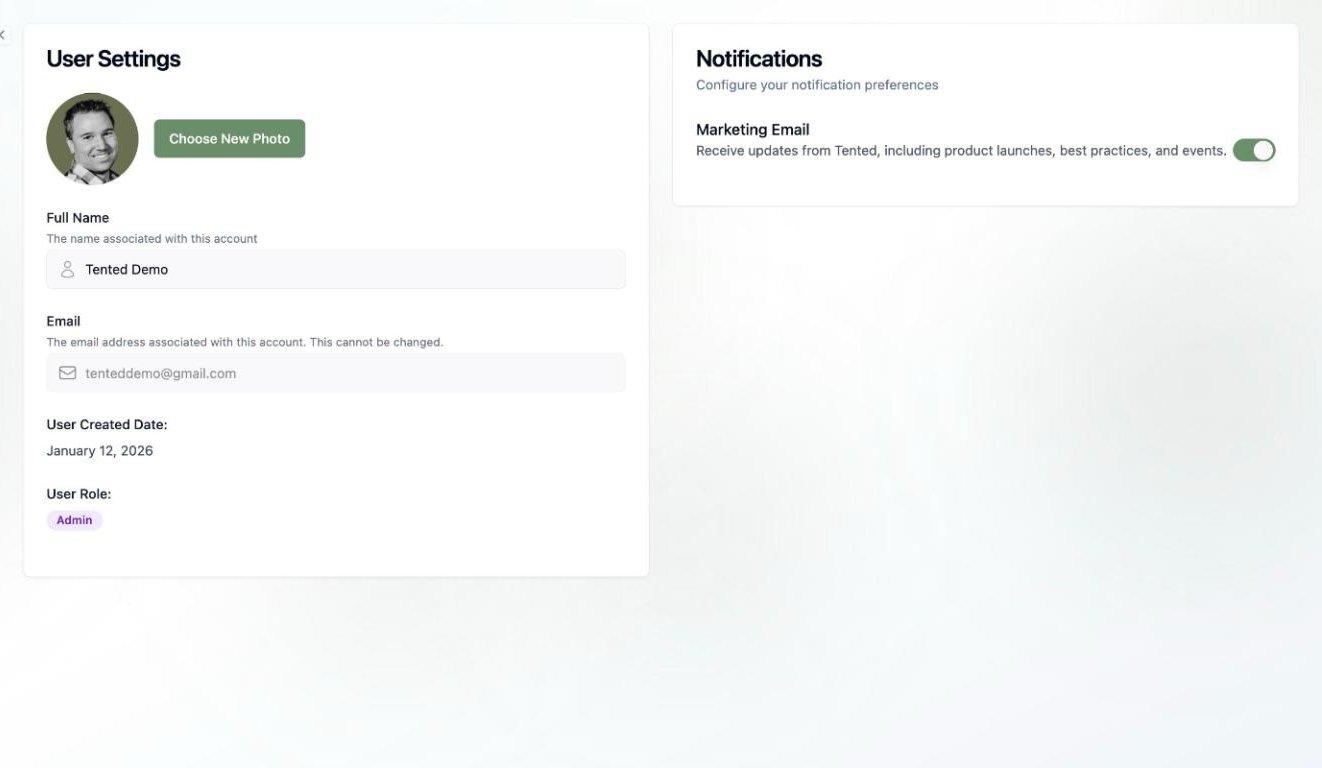
User Settings Overview
User settings allow you to customize your personal experience with Tented, including profile information, notification preferences, and account security settings.Profile Settings
Personal Information
Basic Profile:- Name: Your display name in Tented
- Email: Primary email address for account
- Profile Picture: Upload a profile photo
- Bio: Brief description about yourself
- Phone Number: For account recovery and notifications
- Timezone: For accurate timestamps and scheduling
- Language: Interface language preference
- Date Format: How dates are displayed
- Job Title: Your role or position
- Company: Organization you work for
- Industry: Your business sector
- Website: Your personal or company website
Account Preferences
Display Settings:- Theme: Light, dark, or system preference
- Density: Compact or comfortable interface
- Sidebar: Collapsed or expanded by default
- Notifications: Visual notification preferences
- Default View: Dashboard layout preference
- Sort Order: How tents are sorted by default
- Page Size: Number of items per page
- Auto-refresh: Enable/disable automatic updates
Notification Settings
Email Notifications
Account Notifications:- Login Alerts: Notify of new login attempts
- Password Changes: Alert when password is changed
- Security Events: Important security notifications
- Account Updates: Changes to account settings
- New Submissions: Form submission alerts
- Publishing Updates: Tent publication notifications
- Collaboration: Team member activity alerts
- Performance: Analytics and performance reports
- Product Updates: New features and improvements
- Tips and Best Practices: Educational content
- Community News: Updates from Tented community
- Promotional Offers: Special deals and discounts
In-App Notifications
Real-Time Alerts:- Form Submissions: Instant submission notifications
- System Messages: Important system updates
- Team Activity: Collaboration notifications
- Performance Alerts: Critical performance issues
- Sound: Enable/disable notification sounds
- Desktop: Browser desktop notifications
- Mobile: Push notifications on mobile
- Frequency: How often to receive notifications
Security Settings
Password Management
Password Security:- Current Password: Verify current password
- New Password: Set strong new password
- Password Requirements: Minimum complexity rules
- Password History: Prevent password reuse
- Use at least 8 characters
- Include uppercase and lowercase letters
- Add numbers and special characters
- Avoid common words or personal information
Two-Factor Authentication
2FA Setup:- Enable 2FA: Add extra security layer
- Authenticator App: Use Google Authenticator or similar
- SMS Backup: Phone number for backup codes
- Recovery Codes: Save emergency access codes
- Backup Codes: Generate new backup codes
- Device Management: Manage trusted devices
- Recovery Options: Set up account recovery
- Disable 2FA: Turn off two-factor authentication
Session Management
Active Sessions:- Current Session: Your current login session
- Other Devices: Sessions on other devices
- Session Details: Device, location, and time
- End Session: Log out from specific devices
- Auto-logout: Automatic logout after inactivity
- Session Timeout: How long sessions remain active
- Device Trust: Trusted device settings
- Security Alerts: Unusual activity notifications
Privacy Settings
Data Privacy
Data Collection:- Analytics Data: Usage analytics and metrics
- Performance Data: System performance information
- Error Reporting: Automatic error reporting
- Feature Usage: How you use Tented features
- Anonymous Usage: Share anonymous usage data
- Product Improvement: Help improve Tented
- Marketing Research: Participate in user research
- Third-Party Sharing: Data sharing with partners
Account Privacy
Profile Visibility:- Public Profile: Make profile visible to others
- Team Visibility: Show profile to team members
- Contact Information: Share contact details
- Activity Status: Show when you’re online
- Tent Visibility: Default tent visibility settings
- Form Data: How form submissions are handled
- Analytics Sharing: Share analytics with team
- Export Permissions: Control data export access
Workspace Settings
Team Management
Team Membership:- Current Teams: Teams you’re a member of
- Team Roles: Your role in each team
- Permissions: What you can do in each team
- Team Settings: Team-specific preferences
- Pending Invitations: Team invitations waiting for response
- Invitation Settings: How you receive invitations
- Auto-accept: Automatically accept team invitations
- Notification Preferences: Invitation notification settings
Workspace Preferences
Default Settings:- Default Team: Which team to work in by default
- Default Tent Settings: Default settings for new tents
- Default Brand Settings: Default brand colors and fonts
- Default Form Settings: Default form configurations
- Folder Structure: How to organize tents
- Tagging System: Default tags for tents
- Sorting Preferences: Default sorting options
- Filter Settings: Default filter preferences
Integration Settings
Connected Accounts
Social Media:- LinkedIn: Connect LinkedIn account
- Twitter: Connect Twitter account
- Facebook: Connect Facebook account
- Other Platforms: Connect other social accounts
- CRM Systems: Connect to CRM platforms
- Email Marketing: Connect email marketing tools
- Analytics: Connect analytics platforms
- Project Management: Connect project management tools
API Access
API Keys:- Generate API Key: Create new API key
- Key Management: Manage existing API keys
- Permissions: Set API key permissions
- Usage Monitoring: Monitor API usage
- Webhook URLs: Configure webhook endpoints
- Event Triggers: Set up event triggers
- Security: Configure webhook security
- Testing: Test webhook functionality
Billing and Subscription
Subscription Management
Current Plan:- Plan Type: Your current subscription plan
- Billing Cycle: Monthly or annual billing
- Next Billing Date: When your plan renews
- Usage Limits: Current usage vs. plan limits
- Upgrade Plan: Move to higher tier
- Downgrade Plan: Move to lower tier
- Change Billing: Switch billing frequency
- Cancel Subscription: Cancel your subscription
Payment Information
Payment Methods:- Credit Cards: Manage credit card information
- Bank Accounts: Set up bank account payments
- PayPal: Connect PayPal account
- Other Methods: Alternative payment options
- Past Invoices: View previous invoices
- Payment History: Track payment history
- Refunds: Request refunds if needed
- Tax Information: Manage tax settings
Troubleshooting Settings
Common Issues
Settings Not Saving:- Check internet connection
- Clear browser cache
- Try different browser
- Contact support if persistent
- Check notification permissions
- Verify email settings
- Test notification delivery
- Review spam/junk folders
- Verify email and password
- Check two-factor authentication
- Clear browser cookies
- Try password reset
Getting Help
Support Resources:- Help Center: Documentation and guides
- Community Forum: User community support
- Support Tickets: Direct support requests
- Live Chat: Real-time support assistance
- Password Reset: Reset forgotten password
- Account Recovery: Recover locked account
- Data Recovery: Recover lost data
- Emergency Access: Emergency account access
Next: Workspace Settings
Learn how to configure your workspace settings and team preferences.